

TryTokka
Know your API invoice before finance asks.
Paste a read-only key — no proxy, no SDK, no code change. Scout emails you after daily sync when you cross your limit, usually within ~24h.
- 8 providers
- Daily Scout
- Email after sync
- No proxy


An Acsaven product by Samson PG
Today
▼ 18.3% lower vs yesterday$3.4218
Daily pulse
This week
▲ 11.6% higher vs previous 7 days$24.86
Trailing 7 days
This month
$71.40
Month to date
Monthly safety buffer
Halfway to your limit
$28.60 of $100.00 untouched
$71.40 spent · 71% used
30-day trend
$71.40
By provider
- OpenAI$38.92
- Anthropic$21.15
- OpenRouter$7.8500
- Google Gemini$3.4800
Same dashboard as after signup · Open full demo →
The whole idea
You don't watch your spend. Scout does.
Connect once
Add the provider credential type documented in Product setup. You can revoke or replace a connection later.
Scout syncs daily
Every provider pulled into one number automatically. No dashboards to remember, no ritual to keep up.
It emails you — only when it matters
Silent while synced spend is under budget. When the next daily sync finds your total over the limit, Scout emails you — usually within about 24 hours. Sync now anytime for fresher numbers.
7 days free · No credit card · Product setup guide
Direct answer
What is TryTokka?
TryTokka is an AI API invoice monitor for developers and small teams — not a social video app, not affiliated with TikTok, not ToreTokka (the Bangladesh news app at toretokka.com), not the Tokka video-chat app, not a different product called Tryakka (that spelling is this site), and not a chat-plan session-limit widget. Connect billing keys for OpenAI, Anthropic, Google Gemini, OpenRouter, and more; Scout emails you when spend crosses the limit you set after daily sync or Sync now (usually within ~24h). Built by Samson PG. Prefer a cost tracker comparison when you are choosing between proxies, tracing tools, and spend alerts. 7-day free trial, no credit card. Why the name isn’t TikTok →
Explore TryTokka
Calculate, compare, or set up spend monitoring
Use the free tools without an account, read the comparison methodology, or follow the product setup guide.
Try without an account
5★ average from 15 ratings across our free tools.
Budgets you can glance
Named limits by project tag
Set a workspace safety buffer, then optional groups for Client work, Internal, and more. Scout emails after sync when a limit is crossed.
- Client work60%
$60.07 of $100.00
- Internal113%
$11.33 of $10.00
Example figures · Open full demo →
One dashboard, every provider
Connect the tools you already pay for
Paste an admin or billing key once. Scout syncs usage daily and rolls it into one honest total — click Sync now anytime for fresh numbers after sync finishes.

OpenAI
GPT-4o, GPT-4o mini, o1, o3, Whisper, DALL·E, Embeddings
Also tracks Cursor BYOK (OpenAI backend)
Track OpenAI spend →
Anthropic
Claude Opus, Sonnet, Haiku — all Claude models
Also tracks Cursor BYOK (Anthropic backend)
Track Anthropic spend →
Google Gemini
Gemini Pro, Gemini Flash — via Google Cloud Billing
Also tracks Cursor BYOK (Gemini backend)
Track Google Gemini spend →
OpenRouter
Gateway for 315+ models when you pay OpenRouter — DeepSeek, Mistral, Llama, Groq, Kimi, Grok-via-OpenRouter, Cohere, and more
Track OpenRouter spend →
xAI (Grok)
Grok models via xAI — team billing usage from the Management API
Azure OpenAI
GPT-4o, GPT-4, embeddings — via Azure Cost Management
Track Azure OpenAI spend →
AWS Bedrock
Claude, Llama, Titan — via AWS Cost Explorer
Track AWS Bedrock spend →
Cursor (Teams admin)
Per-model Cursor usage — Teams/Business admins only
Track Cursor (Teams admin) spend →
Manual Entry
Flat subscriptions: Cursor Pro, ChatGPT Plus, or any fixed monthly fee

Keys are encrypted at rest. We read billing usage only — never your prompts or outputs. Free cost calculator.
The question we get asked
“OpenAI already has spend limits. Why do I need this?”
OpenAI's spend alerts cover OpenAI. Anthropic's Console covers Anthropic. Neither one knows the other exists — and OpenAI budget alerts are notifications, not a guaranteed hard stop. If you use both providers — plus Gemini, OpenRouter, Cursor, or Azure — your actual AI spend is invisible to all of them individually.
And if you're running AI agents (Cursor, Claude Code, GitHub Copilot) that make API calls autonomously overnight — provider dashboards show the aftermath. Scout emails after the next daily sync (or Sync now), usually within ~24h — not the moment a loop starts. Pair Scout with a verified kill switch if you need enforcement at night. See also how TryTokka differs from Helicone, Portkey, and LiteLLM.
TryTokka watches everything in one place. One number. One alert. The total picture no single provider can give you.
Accurate as of July 2026. Provider features change — if anything above is out of date, let us know.
Where the $9 goes
Moments the product actually measures
Solo is $9/mo. We highlight alerts, spike causes, and estimate-vs-CSV checks — not a promised ROI. Results depend on your usage and how you act on Scout emails.
Caught overspend
Scout emails after daily sync when you cross the limit you set — usually within ~24h — so a runaway day doesn’t wait for the invoice.
Spike cause, not a gut feel
Open any hot day on the spend calendar. “What caused this?” shows which model drove the jump vs your 7-day average.
Which project spent it
OpenAI projects and Anthropic workspaces come back split from the admin key you already connected — so the bill reads “support $900, agents $700”, not one $4,200 line you have to guess at.
Estimate vs CSV check
Import a provider CSV and see synced totals vs the invoice line — so you can spot estimate gaps, not treat usage×rate as a settled bill.
The win feature
“What caused this?” — invoice days that actually explain themselves
Session-limit widgets tell you a window is full. TryTokka tells you which model burned the dollars on a hot day — vs your 7-day average — so you can fix the loop, not guess. Pair it with CSV invoice match in Settings when you want synced totals vs the provider bill.
- ✓Per-model spend on the spike day vs rolling average
- ✓Spike multiple per model (e.g. "3.2× above normal")
- ✓Contribution % — which model drove the majority of the charge
- ✓CSV reconcile — imported invoice vs synced total (Settings → Billing)
What happened on 2026-09-05?
Same panel as Spike investigation · Example from sample spend
$5.8000 spent
Your 7-day average: $1.5000/day
3.9×
above average
Breakdown by model
gpt-4o$4.1760
72% of total
Normal daily avg: $0.59407× above average
gpt-4o-mini$1.0440
18% of total
Normal daily avg: $0.14857× above average
claude-haiku-4$0.5800
10% of total
Normal daily avg: $0.08257× above average
Open any hot day on the spend calendar after you sync
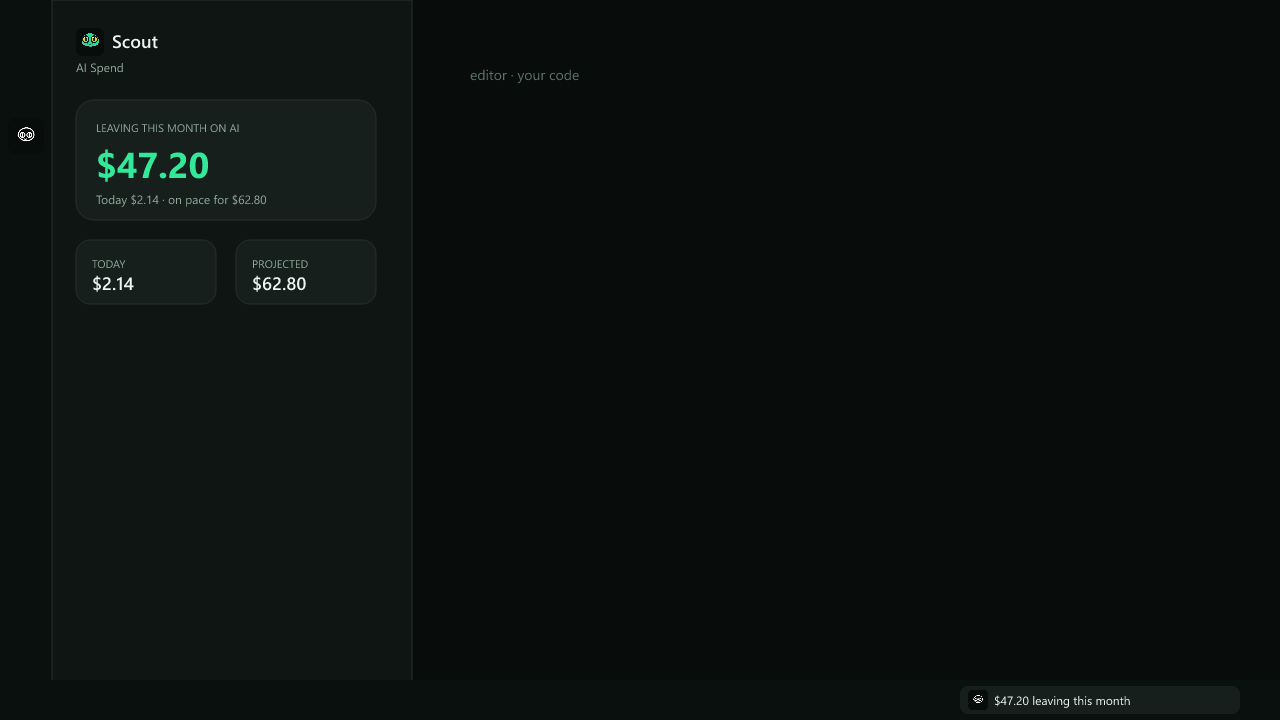
Where you already work
Scout in VS Code — spend in your status bar
Install the free Scout extension and see month-to-date AI spend beside your editor — no tab switch, no proxy, no code changes. Same Widget Token as the Chrome extension; works in VS Code, Cursor, and VSCodium.
Paste a token from Settings → Apps, or try demo mode first with sample spend.
Built for indie devs
AI spend dashboard features that catch spikes early
That first claim is checkable — read the encryption source.
7 days free · No credit card · See pricing · How TryTokka handles security →
Common questions
Quick answers
Is TryTokka related to TikTok?
No. TryTokka (trytokka.com) is an AI API spend monitoring dashboard for developers — it tracks eight API providers plus flat subscriptions, with daily Scout threshold alerts. It has no affiliation with TikTok, ByteDance, or any social media / short-video app. It is also not ToreTokka (toretokka.com / টরেটক্কা), a Bangladeshi news-aggregator app, not Tokka, the stranger video-chat app on Google Play and the App Store, and not Tokka Labs (tokkalabs.com), a crypto proprietary-trading firm. Searches for Tryakka, tryakka, or “try tokka” are the same product; those are misspellings of TryTokka, not a different app. A search for trytokka means this spend dashboard.
Do I need an API key to use TryTokka?
Yes — TryTokka reads provider billing/usage reports with a read-only billing or Admin key (not a proxy in your request path). OpenAI needs an org Admin key (sk-admin-…), not a project sk- key. Anthropic, Gemini, and others use their documented billing credentials. You can revoke a connection anytime.
What type of API key do I need for OpenAI?
An Admin / organization API key (starts with sk-admin-...), not a project or user key (sk-...), because usage figures are only readable with an admin credential. Create one at platform.openai.com → Settings → Organization → Admin keys, and set Permissions to Read only. That matters: an admin key with full permissions can manage projects, members and other keys, whereas a read-only one can do nothing but read — which is all TryTokka needs for the single usage endpoint it calls. Other providers (Anthropic, Gemini, OpenRouter, Azure, Bedrock, Cursor) use their standard API or billing keys.
Is TryTokka a subscription limit tracker for Claude or ChatGPT chats?
No. TryTokka monitors API and org billing spend across providers (keys you connect), with daily Scout threshold emails. It is not a menu-bar widget for chat-plan session windows (5-hour / weekly consumer caps). If you need invoice-level API cost truth for builders and teams, you are in the right place.
How do I get alerted before my AI API bill gets too high?
Set a daily or monthly dollar limit during setup. Scout checks after each sync (once daily automatically, or when you click Sync now) and emails you — usually within ~24h of crossing the limit. Not a real-time circuit breaker.
How is TryTokka different from a proxy tool like Helicone?
A proxy sits between your app and the AI provider, so every prompt and response routes through it and you have to change your API base URL in each project. TryTokka only reads your provider billing totals — no code changes, no proxy in your request path, and your prompts never leave the provider.
More from the Try family
Private browser utilities plus Scout for AI spend — same parent company (
 Acsaven). Free tools keep files on your device; TryTokka is optional when you need spend alerts. Open each product on its official .com site.


Scout is ready to watch your back.
Full product for 7 days. No card. Then stay Free with one provider, or choose Solo from $9/month.
From Scout's desk
Get weekly AI cost insights — free
Every Sunday: what AI models are costing developers like you, which switches save money, and one thing you can do this week to spend less.
No spam. Unsubscribe anytime.