How to Avoid Surprise AI API Bills
Published June 29, 2026 · Updated July 26, 2026 · Samson PG
A $300 invoice rarely starts as a $300 charge. It starts as a forgotten batch job nobody was watching. Here's how to actually catch it early.
A practical way to avoid a surprise AI API bill is a threshold alert after each usage sync — not a dashboard you have to remember to check. TryTokka checks daily (or when you press Sync now), so alerts usually arrive within about 24 hours. Most surprise bills do not come from one big mistake. They come from a forgotten retry loop, a batch job left running, or a feature that quietly got more traffic than expected, all compounding for days before anyone notices.
Why surprise bills actually happen
A few patterns show up again and again:
- A retry loop with no cap, firing repeatedly against a failing endpoint.
- A cron job or background worker that runs more often than intended after a deploy.
- A feature that becomes more popular than expected — good news that still shows up as a cost spike.
- A leaked or reused API key making requests you did not authorize.
None of these show up as one dramatic charge. They show up as a normal-looking day-three-times-bigger than usual, which is easy to miss if you are only glancing at a dashboard occasionally — see how to actually track OpenAI spend for why checking alone is not enough.
Layer 1: a hard usage cap as a last resort
Most providers let you set a usage limit that stops billing once you hit it. Set one — it is free insurance against a truly runaway script. But treat it as a last resort, not a plan. By the time it fires, whatever caused the spike has already been running for a while, and your app has now stopped working entirely for the rest of the billing period.
Layer 2: a spend alert that fires before the cap
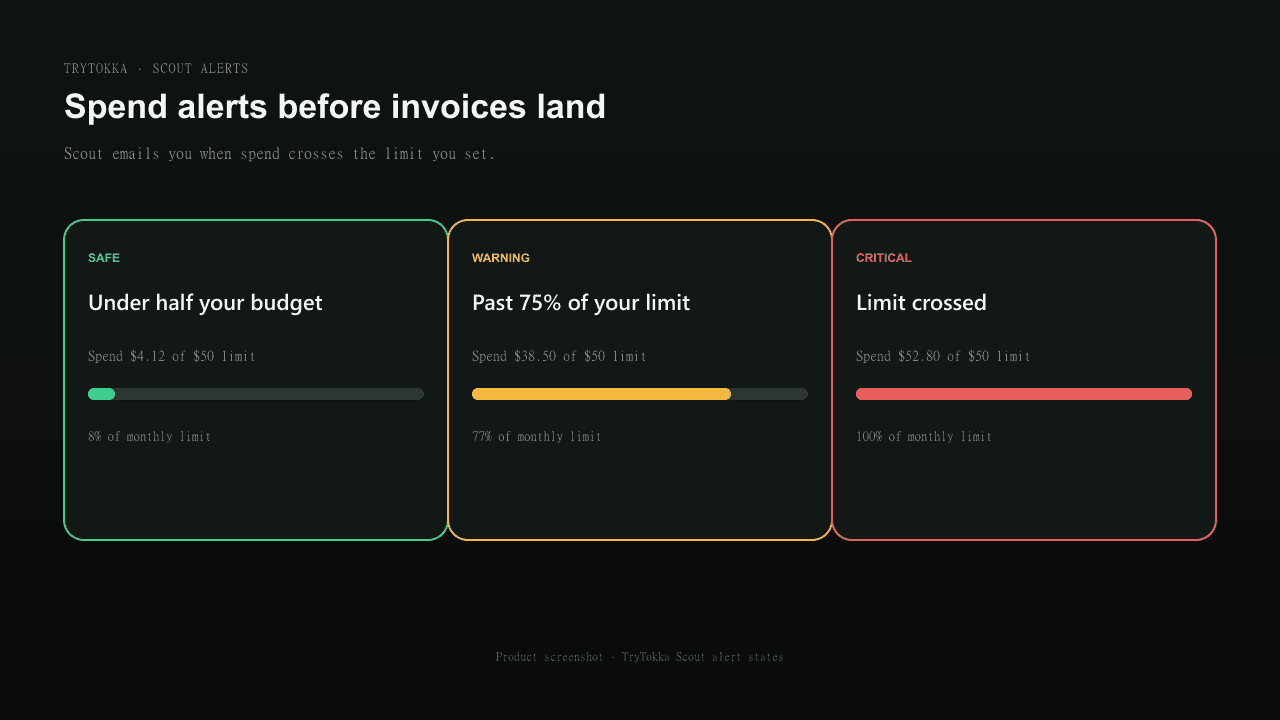
Set a daily or monthly dollar threshold well below your hard cap, and have something email you within 24 hours of crossing it. This is the difference between finding out while you still have time to investigate and finding out when the invoice arrives. It does not need to be complicated — a threshold, an email address, and a sync that runs automatically.
Layer 3: catch the spike, not just the total
A threshold alert catches sustained overspend, but a sudden spike inside an otherwise normal month can slip past it if the threshold has not been crossed yet. A spike check — comparing today's spend against your recent daily average — catches the “something is wrong right now” case on the same day it starts, which matters most for the retry-loop and leaked-key scenarios above.
A simple checklist
- Treat OpenAI org/project budgets as alerts unless you have verified a real cutoff in your account — notification email is not the same as stopping traffic.
- Set a spend alert meaningfully below what you can afford, on every provider you actually pay for.
- Keep a verified kill switch for overnight agents: rate-limit or rotate keys, manage prepaid balance carefully, or enforce caps in your own gateway/middleware.
- Rotate any API key you suspect may have leaked, immediately, before investigating further.
TryTokka's Scout handles multi-provider threshold emails after daily sync (or Sync now) — usually within ~24h, with a same-day spike check when you sync. It observes and warns; it does not cut off provider keys. See pricing or jump straight to a free 7-day trial, no card required.
FAQ
What is the single biggest cause of surprise AI API bills?
A background process that keeps running after you stop paying attention to it — a retry loop without a cap, a cron job that fires more often than intended, or a feature that got more usage than expected. The charge itself is usually small per request; the surprise comes from volume nobody was watching.
Will a hard usage limit stop a surprise bill?
Only if the provider still offers a verified cutoff. OpenAI org/project spend alerts are notifications — email when you cross a threshold, not a guaranteed stop. A real circuit breaker is rate-limiting or rotating keys, prepaid balance controls, or enforcement in your own gateway. Even then, alerts remain the early-warning layer.
How fast can a spend alert actually catch a spike?
It depends on how often the tool syncs usage data and how the alert is configured. TryTokka syncs once daily and checks your threshold after each sync, so a sustained overspend is caught within the same day. You can also trigger a manual sync at any time from the dashboard for an immediate check.
Sources and verification
Claims are checked against the sources below. Provider prices and product features can change; verify the source before making a purchasing or production decision. Last checked 2026-07-18.
- OpenAI API pricing — OpenAI; checked 2026-07-18
- Claude API pricing — Anthropic; checked 2026-07-18
Found an outdated statement? Email legal@trytokka.com.
Put this into practice
Jump from this guide to the matching TryTokka landing — then start a free trial when you are ready.
- Track OpenAI API Spend in One Dashboard →
- AI API Cost Tracker: What to Measure →
- Why Did My AI API Bill Spike? →
- OpenRouter Cost Tracker & Alerts →
- Track Google Gemini API Costs →
- Azure OpenAI Cost Tracker →
- AWS Bedrock Cost Tracker →
- Team AI Spend Tracking — By Project or Developer →
- Portkey Alternative for API Spend →
- LiteLLM Alternative for Cost Alerts →
- OpenMeter Alternative for AI API Spend →
- Vantage Alternative for AI API Costs →
- LangSmith Alternative for API Spend →
- Braintrust Alternative for API Spend →
- CloudZero Alternative for AI API Spend →
- Datadog LLM Observability Alternative for Spend →
- TruLens Alternative for API Spend →
- Phoenix (Arize) Alternative for API Spend →
- AI API Spend Kill Switch vs Scout Alerts →
Stop checking dashboards. Start getting warned.
TryTokka combines eight API providers plus flat subscriptions. Scout checks daily and emails you when synced spend is over your limit, usually within about 24 hours.
7 days free, no credit card required.
From Scout's desk
Get weekly AI cost insights — free
Every Sunday: what AI models are costing developers like you, which switches save money, and one thing you can do this week to spend less.
No spam. Unsubscribe anytime.
Keep reading
How to Track OpenAI API Spend Without Daily ChecksOpenAI's own dashboard works, but it only tells you what you already spent. Here's how to actually stay ahead of it.Best AI API Cost Tracker for Indie Devs in 2026Most "AI cost" tools are built for enterprise FinOps teams with a budget line for tooling. Here's what actually fits a one-person side project.OpenAI vs Anthropic Billing: What Each ShowsBoth dashboards are fine on their own. The problem shows up the moment you use both providers in the same project.
← All TryTokka articles